Friday, 3 February 2017

SPForm Loading gig on Saving

Insert the following code into JS-editor
 
fd.onsubmit(function() {
     SP.UI.ModalDialog.showWaitScreenWithNoClose('Processing...', 'Please wait while request is in progress...', 150, 330);
     return true;
});

Set Person or group field via script


<script src="/jquery-1.10.2.min.js" type="text/javascript"></script> 
<script src="/jquery.SPServices-2014.02.min.js" type="text/javascript"></script> 
<script type="text/javascript"> 
(function () {
    var ctx = {};
    ctx.Templates = {};
    ctx.Templates.Fields = {
        'ProjectResponsible': {
            'NewForm': renderAssignedTo
        }
    };
    SPClientTemplates.TemplateManager.RegisterTemplateOverrides(ctx);
})();
function renderAssignedTo(ctx) {

     var currentUser = $().SPServices.SPGetCurrentUser({fieldNames: ["Title", "Name"]});   //get current user properties
alert(currentUser.Title);
     var currentUserEntry = createUserEntity(currentUser.Name,currentUser.Title);
     //Set user default value
     ctx.CurrentFieldValue = [];   //Note: it is assumed the user field is a multi-valued field (!)
     ctx.CurrentFieldValue.push(currentUserEntry); 
     return SPClientPeoplePickerCSRTemplate(ctx);
}
function createUserEntity(userLoginName,userDisplayName)
{
   return {
      Description: userLoginName,
      DisplayText: userDisplayName,
      EntityGroupName: "",
      EntityType: "",
      HierarchyIdentifier: null,
      IsResolved: true,
      Key: userLoginName,
      MultipleMatches: [],
      ProviderDisplayName: "",
      ProviderName: ""
   };
}
</script> 

Thursday, 2 February 2017

How to get sharepoint list data on sql by calling content db


Create a view for accessing list items in db


/*lsitid is GUID of list name */


ALTER  View [dbo].[ViewName] AS   /*Say Vehicle */
 SELECT 
  nvarchar1 as VehicleName,
  CAST(tp_ID AS INT) as ID,
  int2 as VehicleCategory,
  float1 as SortOrder
  
FROM

 [WSS_Content_siteName].[dbo].[AllUserData] AS list

WHERE

 list.tp_iscurrentversion=1 AND list.tp_RowOrdinal=0

AND list.tp_CalculatedVersion=0 AND list.tp_DeleteTransactionId=0x AND

    list.tp_listid='88443F36-7C2F-4779-958F-56C38B9923423'

If you did any changes on list item and you need to select only the approved changes then you must add another filter condition and tp_ModerationStatus=0

Thus


/*lsitid is GUID of list name */
ALTER  View [dbo].[ViewName] AS   /*Say Vehicle */
 SELECT 
  nvarchar1 as VehicleName,
  CAST(tp_ID AS INT) as ID,
  int2 as VehicleCategory,
  float1 as SortOrder
  
FROM
 [WSS_Content_siteName].[dbo].[AllUserData] AS list
WHERE
 list.tp_iscurrentversion=1 AND list.tp_RowOrdinal=0
AND list.tp_CalculatedVersion=0 AND list.tp_DeleteTransactionId=0x AND
    list.tp_listid='88443F36-7C2F-4779-958F-56C38B9923423'
and tp_ModerationStatus=0


Suppost the VehicleACtegory is a look up field with multiple selection then you will not get that value on the above query. In order to select the lookupdata
  you need the below query


/* Here AUDJ.tp_FieldId is the GUID of VehicleCategory field in Vehicle List and AUD.tp_listid is GUID of vehicle list */
CREATE  View [dbo].[VehicleCategory] AS
 SELECT 
AUD.tp_ID as ID,
  nvarchar1 as Title,
  CAST(AUDJ.tp_ID AS INT) as [VehicleCategory],
  float1 as SortOrder
   FROM
[WSS_Content_siteName].[dbo].[AllUserDataJunctions] AUDJ, [WSS_Content_siteName].[dbo].[AllUserData] AUD
  WHERE
 AUDJ.tp_iscurrentversion=1 AND AUDJ.tp_CalculatedVersion=0 AND AUDJ.tp_DeleteTransactionId=0x
 and AUDJ.tp_FieldId like '6983dc8a-7e23-41d8-a8ba-ee53339c2bb7'
 AND AUD.tp_listid='88443F36-7C2F-4779-958F-56C38B994B78'
 AND AUD.tp_iscurrentversion=1 AND AUD.tp_rowOrdinal=0 AND AUD.tp_CalculatedVersion=0 AND AUD.tp_DeleteTransactionId=0x
 AND AUDJ.tp_DocId = AUD.tp_DocId


Wednesday, 1 February 2017

Set Person or group filed with current user using javascript

<script src="/jquery-1.10.2.min.js" type="text/javascript"></script> 
<script src="/jquery.SPServices-2014.02.min.js" type="text/javascript"></script> 
<script type="text/javascript"> 
(function () {
    var ctx = {};
    ctx.Templates = {};
    ctx.Templates.Fields = {
        Field Display Name': {
            'NewForm': renderAssignedTo
        }
    };
    SPClientTemplates.TemplateManager.RegisterTemplateOverrides(ctx);
})();
function renderAssignedTo(ctx) {
     var currentUser = $().SPServices.SPGetCurrentUser({fieldNames: ["Title", "Name"]});   //get current user properties
     var currentUserEntry = createUserEntity(currentUser.Name,currentUser.Title);
     //Set user default value
     ctx.CurrentFieldValue = [];   //Note: it is assumed the user field is a multi-valued field (!)
     ctx.CurrentFieldValue.push(currentUserEntry); 
     return SPClientPeoplePickerCSRTemplate(ctx);
}
function createUserEntity(userLoginName,userDisplayName)
{
   return {
      Description: userLoginName,
      DisplayText: userDisplayName,
      EntityGroupName: "",
      EntityType: "",
      HierarchyIdentifier: null,
      IsResolved: true,
      Key: userLoginName,
      MultipleMatches: [],
      ProviderDisplayName: "",
      ProviderName: ""
   };
}
</script> 

Tuesday, 24 January 2017

Redirect to any other views or URL right after creation of an item in Sharepoint list new spform

//For redirecting
//Buton Save event
//this is only working if we use the default save button
//if we change the default save button to our custom button write these code on our custom buton event
fd.onsubmit(function() {
//Identify the typereg value
//Choice field or lookup field value
var typeRegValue=fd.field('Typereg').control()._el().find('select option:selected').text();
   if(typeregValue==Test)
   {
   //we can redirect to any list
     fd.sourceFormParam('/Lists/MyList/Test.aspx');
  
   }
   if(typeregValue==Test1)
   {
     fd.sourceFormParam('/Lists/MyList/Test1.aspx');
   }
   else
   {
     fd.sourceFormParam('/Lists/MyList/AllItems.aspx');
   }
    return true;
});

///
//If you want redirect to the edit form of the current saved item right after the creation
//Use below code
fd.onsubmit(function() {
  var uri = fd.setUrlParam(decodeURIComponent(window.location.href), 'FDRedirectWithID', 'fd_Item_Edit.aspx?ID=');
  fd.sourceFormParam(uri);
  return true;
});

How to get the Version History of Share point List items


select [WSS_Content_NEWSITE].[dbo].[AllUserData].tp_id, nvarchar1 as Title, float1 as ID, [WSS_Content_NEWSITE].[dbo].[AllUserData].tp_version as Version into temTab
from
          (
                   select [WSS_Content_NEWSITE].[dbo].[AllUserData].tp_id, min(tp_version) as Version, tp_listID
                   from [WSS_Content_NEWSITE].[dbo].[AllUserData]
                   Where AllUserData.tp_ListID = 'B390923C-EC6C-428E-9704-1244EAD0144F'
                   group by tp_id, tp_listid
          )
 as Sub inner join [WSS_Content_NEWSITE].[dbo].[AllUserData]  on AllUserData.tp_id = Sub.tp_id and Alluserdata.tp_version = Sub.Version and alluserdata.tp_Listid = sub.tp_listid


 Select * from temTab

'B390923C-EC6C-428E-9704-1244EAD0144F' is your list's GUID

Sunday, 22 January 2017

Unable to find the default new or edit form for list/ document library in SharePoint


Do you have an error message when you try to open a SharePoint library, Edit ore view the properties of a file/folder? This is mostly like that somebody is messed with your forms , ie probably your forms become corrupted or deleted. This can break your entire SharePoint library. This is happening when some one is trying to move a SharePoint library to another one or working on document template forms. 

The error is something like that

  • Unable to find the default new form for list (listname)
  • Unable to find the default edit form for list (listname)

 
I will tell you how you can resolve this.

The basic and simplest method is


    Method 1


    Take back up and delete the existing EditForm of a doc library.

    For this
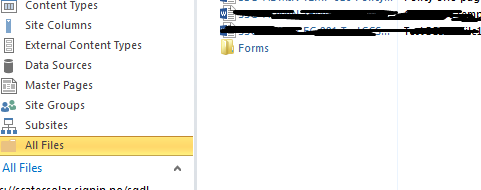
  1.  Open site in Sharepoint Designer 2013
  2.  Go to All Files

3.       Select the document library


4. Click 'Forms' folder


5. Keep the backup of EditForm.aspx

6. Delete the Editform.aspx

7. Then Got to 'lists and libraries' on left side links (Site Objects)

8. Select the library

9. On right side you can see 'Forms' tab.


10. Cleck 'New' link in there.
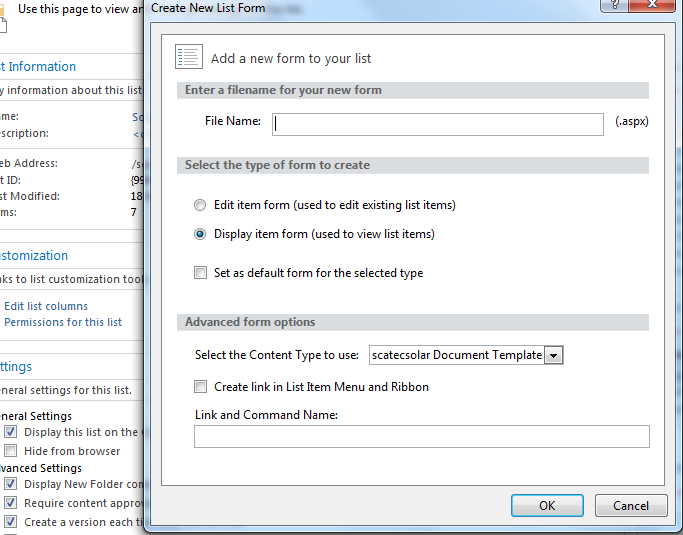
11. 'Create new list Item'  pop up will appear. Ente 'EditForm' in file name space.
 
 
12. In 'Select the type of form to create ' session , choose the radio button ' Edit item form ( Used to edit existing list items).
13. In advanced option ' Select the content type to use ' , select teh content type (Optional, Otherwise it will automatically choose the default one )
14. Refresh the page and try 'Edit Propereties' link on list item menu.
 

Method 2

 
Follow first 6 steps from Method 1
7. Now create a new .ASPX file and name it “EditForm.aspx”. and open it up in the editor.
 
8.  Now create a new library, and find the “EditForm.aspx” file in the new library and open it up. Copy over everything from the “EditForm.aspx” and copy it in the “EditForm.aspx” file you created in your broken library

9. The list Name and List id can be found in the “List and libraries” (see the image below). Also note the “Allitems.html” if this one is missing you can just recreate it using the “New” button.
10. Make sure that when you replace the List ID that you remove the curly brackets { }. As for the Title you can just fill in the name of your library. Now when you save the file in our case “EditForm.aspx” and when you did everything according to the above, it should be visible in “List and libraries” again.
11. Refresh the page and click edit prop    erties from list item, menu